Precision Control Software for SPE Expert Amplifiers.
The dedicated macOS control software to operate and monitor your SPE Expert linear amplifier directly from your shack workstation. Low-latency status tracking, real-time RF power metering, LCD display mirroring, and comprehensive protection monitoring on Apple Silicon & Intel Macs.
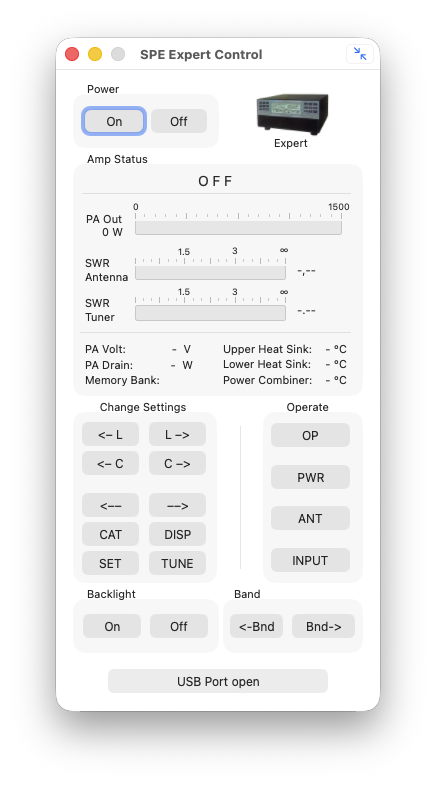
Full Mode: Complete front-panel keypad emulation, ATU tuning, power toggle, and operations.
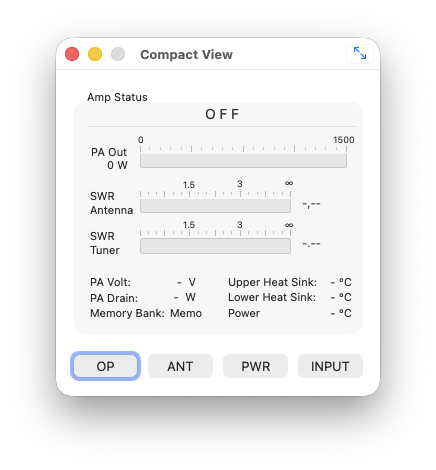
Compact Mode: Instant telemetry, peak power bar, active band, antenna & LCD mirror.
Built for Serious Shack Operation
Designed with Cocoa/AppKit for native speed, seamless USB serial connectivity, and full control over your SPE linear amplifier.
Real-Time Metering
Ultra-low latency tracking of forward power, reflected power, PA supply voltage, drain current, and heat sink temperature with smooth UI refresh.
Full Front Panel Emulation
Switch between Standby and Operate, toggle power levels (Low, Mid, Max), change antennas (ANT 1–4), and engage/bypass the internal ATU with zero delay.
LCD Display Mirror Window
A dedicated high-contrast window reproduces the amplifier's physical character LCD screen for menu navigation, antenna tuning curves, and detailed diagnostic logs.
Active Protection Monitoring
Continuous background polling of amplifier protection circuits. Instant notification of SWR excursions, thermal buildup, or RF overdrive before hardware trip.
Compact & Floating Mode
Switch to a minimalist compact bar or keep the window floating on top of your logger, WSJT-X, or SDR console during DX pileups and contests.
Plug & Play USB Serial
Direct communication via FTDI or standard USB serial chipsets at 38,400 baud. Built-in port selector with automatic reconnection on sleep/wake.
Getting Started in 3 Simple Steps
Connect USB Cable
Connect your SPE Expert amplifier to your Mac using a shielded USB cable. Turn on the amplifier to power the internal USB interface.
Select Port in Settings
Open Settings (⌘ ,), pick your amplifier's USB serial device from the dropdown, and verify the baud rate is set to 38400.
Complete Amplifier Control
Click 'Apply' to initiate communication. The dashboard and LCD mirror will synchronize immediately with live amplifier telemetry.
Protection & Alarm System
MacExpertControl monitors all internal safety thresholds and informs you immediately of potential hazards.
Non-Critical Warnings
Warnings indicate conditions requiring attention that do not immediately shut down the amplifier:
- • SWR ANTENNA: Elevated SWR detected on active antenna port
- • POWER LIMIT EXCEEDED: RF output exceeds designated power ceiling
- • OVERHEATING: PA temperature rising; fan speed automatically boosted
- • ATU BYPASSED: Internal tuner not engaged on the current band
Critical Alarms
Alarms indicate critical conditions. The amplifier switches to Standby automatically to protect hardware:
- • SWR EXCEEDING LIMITS: Dangerous SWR level; operation halted
- • INPUT OVERDRIVING: Excessive drive power applied from transceiver
- • EXCESS OVERHEATING: Thermal limit reached; immediate protection shutdown
- • AMPLIFIER PROTECTION: General hardware safety trip triggered
Frequently Asked Questions
Ready to control your SPE Amplifier from your Mac?
Log in to our customer and beta testing portal to download the latest MacExpertControl installation package (.dmg) for your shack workstation.
Go to Download Area